
Fluent View Layouts Addon
The Fluent View Layouts Addon is a powerful design tool for Modern Events Calendar (MEC) that provides over 20 modern, stylish skins to transform the appearance of your event listings. Designed for a seamless user experience, these layouts are fully responsive across all devices and require no coding knowledge to implement.
Initial Setup
Before you begin, ensure your environment meets the following requirements:
- MEC Version: You must have Modern Events Calendar Lite or Pro installed and active.
- System Requirements: Your site must run at least PHP 7.4 and WordPress 6.0.
- Installation: Download the addon from your Webnus account. Navigate to your WordPress dashboard, go to Plugins > Add New > Upload Plugin, select the file, and click Install Now followed by Activate.

Configuring Shortcodes with Fluent Styles
You can apply professional Fluent designs to any new or existing event shortcode to change how events are displayed on your pages.

To apply the style to a shortcode:
- Navigate to M.E. Calendar > Shortcodes and click Add New or edit an existing one.
- Define a title for your shortcode.
- Under Display Options, locate the Skin dropdown and choose your preferred layout (e.g., Grid View).
- In the Style dropdown, select Fluent.
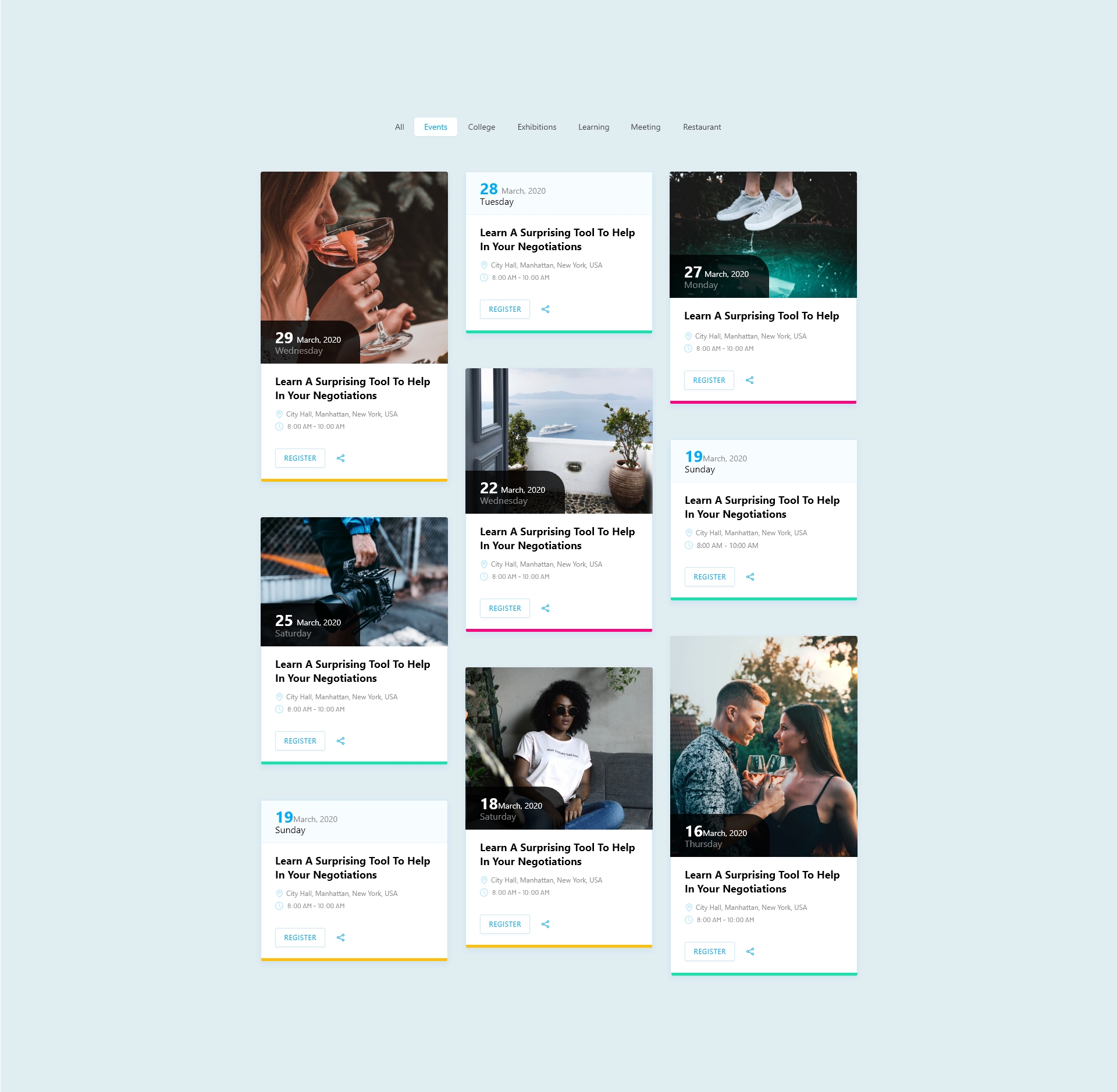
Here you can see some examples.



Applying Fluent Styles to Single Events
This addon allows you to bypass default layouts and use pre-designed skins for individual event pages to save time.
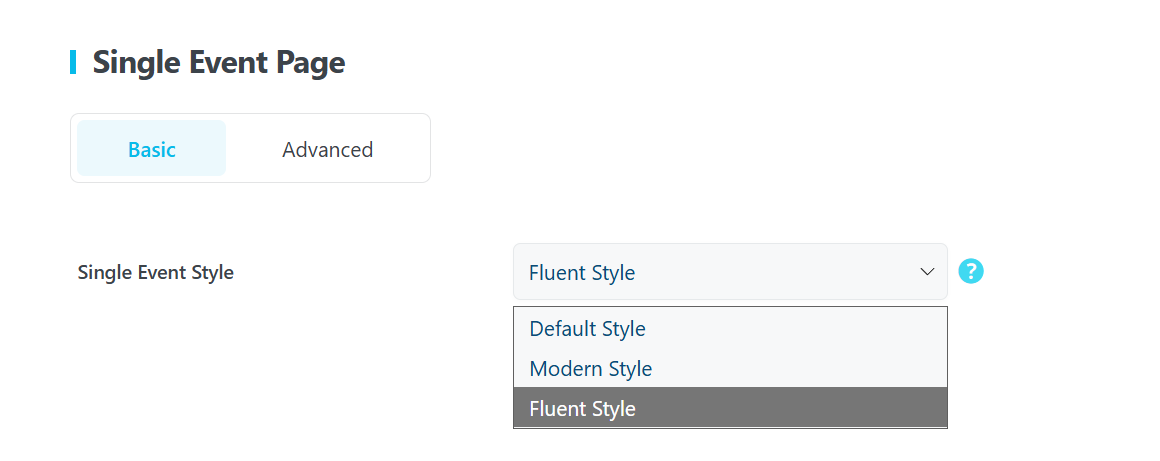
To enable for Single Events:
- Navigate to MEC Settings > Single Event > Basic.
- Locate the Single Event Style dropdown and select Fluent Style.
- You can also adjust the Single Event Date Format and Date Method (e.g., Referred date) in this same menu.
- Click Save Changes.
Pro Tip: Once enabled globally, any new event you create will automatically use the Fluent skin layout.
Global Customization & Appearance Settings
For site-wide design consistency, the addon provides a management section for colors and layout behavior located in MEC Settings > Appearance under the Fluent-view Layout Styles section.
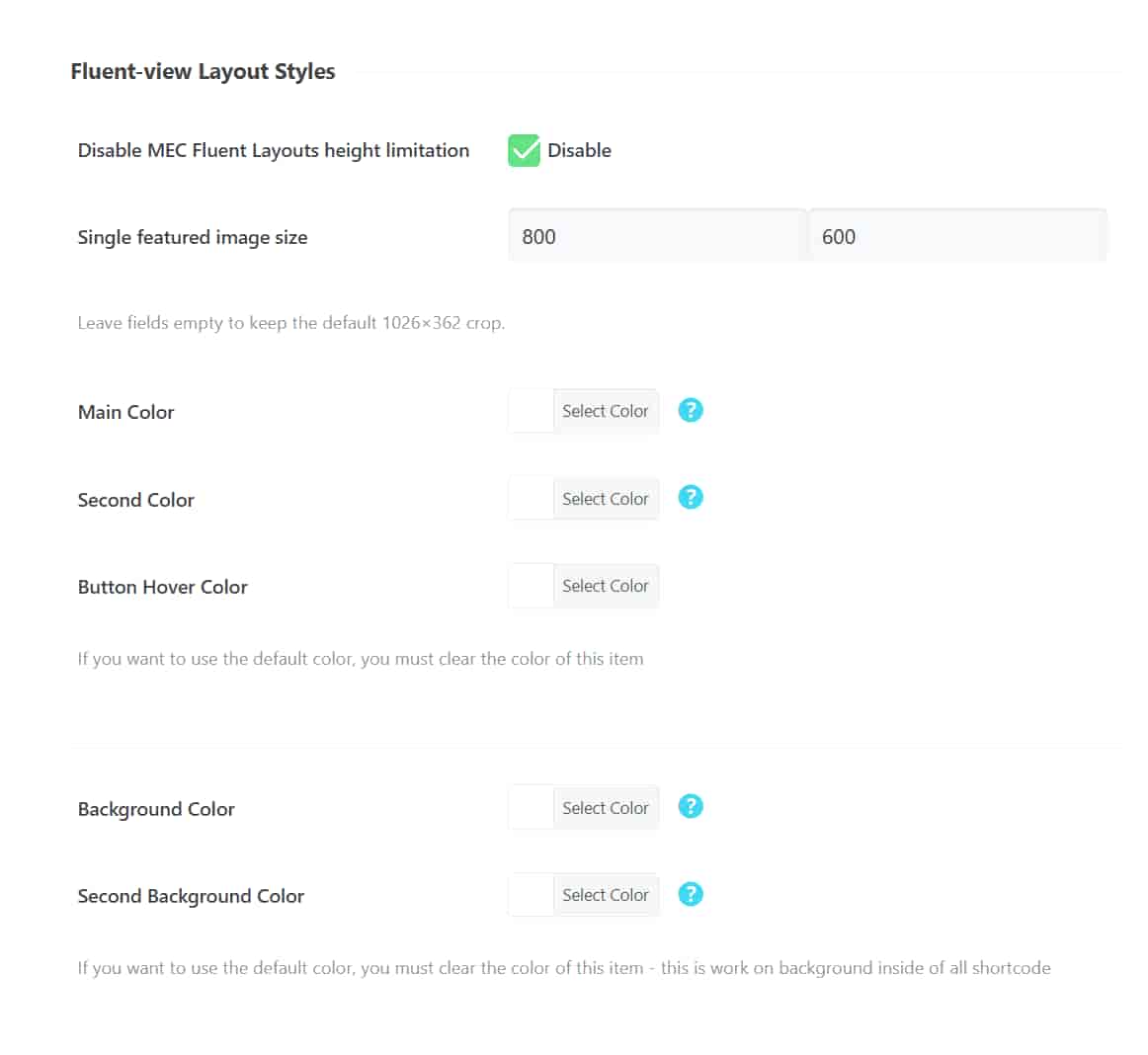
- Disable MEC Fluent Layouts height limitation: Enable this checkbox to remove restrictions on layer heights, allowing for more flexible content displays.
- Single featured image size: Set a custom Width and Height. Leave these fields empty to keep the default 1026×362 crop.
- Main Color: Controls primary elements like icons and title hover colors.
- Second Color: Manages secondary/non-main items.
- Button Hover Color: Changes the appearance of buttons when a user points to them.
- Background Color: Sets the color inside the shortcode and on the sides.
- Second Background Color: Manages the background for the filtering section and slider hover buttons.
Pro Tip: To revert any color to its original look, simply clear the hex code from the color picker field.
Use Cases (When This Addon is Useful)
- Modern Branding: Ideal for websites that need a “magical” transformation of their calendar to align with the latest design trends.
- Responsive Calendars: Essential for organizers whose attendees primarily use mobile or tablet devices, as all 20+ skins are fully responsive.
- Non-Technical Management: Perfect for users who want premium-looking event pages without writing any CSS or HTML code.
- Diverse Event Displays: Useful when you need multiple different styles (e.g., Available Spot, Cover View, or Grid View) for different pages on the same site.
Situations This Addon May Not Be Ideal
- Outdated Environments: This addon will not function on sites running PHP versions lower than 7.4 or WordPress versions older than 5.0.
- External Repositories: The plugin is exclusively available via Webnus; it cannot be updated or managed through the standard WordPress.org repository.
Troubleshooting for Beginners
- Style Not Applying to Shortcodes: Ensure that after choosing your skin, you have specifically selected Fluent from the Style dropdown menu and clicked Update or Publish on the shortcode page.
- Update Not Showing: If you don’t see an “Update Now” option in your Plugins list, verify that your addon license is correctly activated. If issues persist, manually download the latest version from your Webnus dashboard and reinstall it.
FAQ
What is the purpose of the MEC Fluent View Layouts Addon?
The MEC Fluent View Layouts Addon is designed to enhance the Modern Events Calendar (MEC) by providing over 20 modern and stylish layouts for displaying events. It allows users to transform the appearance of their event listings, shortcodes, and single event pages without requiring any coding skills. The addon improves design flexibility, ensures full responsiveness across all devices, and offers a user-friendly customization interface, making it easier to create visually appealing event calendars that align with different website themes and branding.
How do I install and activate the MEC Fluent View Layouts Addon?
A: Ensure that you have the latest version of the Modern Events Calendar (MEC) Lite or Pro installed. Download the Fluent View Layouts Addon from your Webnus account, then navigate to your WordPress dashboard. Go to Plugins > Add New > Upload Plugin, select the downloaded file, and click ‘Install Now.’ After installation, activate the addon to start customizing your event layouts.
Can I apply Fluent View Layouts to existing event shortcodes?
Yes, you can. Edit your existing shortcode by navigating to the Shortcodes page in MEC, selecting the shortcode you wish to modify, and setting the ‘Style’ option to ‘Fluent.’ This will apply the new Fluent Style to your existing shortcode.
Are the Fluent View Layouts responsive on all devices?
Absolutely. The Fluent View Layouts are designed to be fully responsive, ensuring that your events and calendars display correctly on desktops, tablets, and mobile devices, providing a consistent user experience across all platforms.
How can I customize the appearance of single event pages using this addon?
To customize single event pages, go to MEC Settings > Single Event > Basic, select the Fluent Style from the available options in the Single Event Style section, and save your changes to apply the new design to your event pages.
Do I need coding knowledge to use the Fluent View Layouts Addon effectively?
No, the addon is designed for users without any coding experience. It offers a user-friendly interface where you can select and apply different skins through dropdown menus and settings within your WordPress dashboard, making customization straightforward.
Where can I find support if I encounter issues with the addon?
If you experience any difficulties or have questions, you can visit the Webnus Help Center, which offers comprehensive guides and support articles. Additionally, you can submit a support ticket through the support system to receive personalized assistance from the support team.
https://support.webnus.net/en/
How do I update the Fluent View Layouts Addon to the latest version?
To update the Fluent View Layouts Addon, go to your WordPress dashboard and navigate to Plugins > Installed Plugins. If an update is available, you will see an option to update the plugin. Click the Update Now button to ensure you are using the latest version with bug fixes and improvements. If a plugin update is unavailable, you may not have activated the addon license correctly, or you might be using an outdated version and need to manually download this addon through the Webnus dashboard and reinstall it.
What are the system requirements for using the MEC Fluent View Layouts Addon?
The MEC Fluent View Layouts Addon requires the Modern Events Calendar Lite/Pro plugin (version 6.0 or higher). You also need a WordPress site running at least PHP 7.4 and WordPress 5.0.
Does the Fluent View Layouts Addon also work with MEC Lite?
Yes, you can use the Fluent View Layouts Addon with either MEC Lite or Pro.
Updated on: 06/04/2026
Thank you!